Friday, September 13, 2013

Alignment issue on p:selectOneMenu

When <p:selectOneMenu /> aligns with other components.
It is align slightly upper than other components.

To resolve this issue.
simply put each component into each individual <td /> or a panelGrid to wrap the components.
<h:panelGrid columns="3">
  <p:inputText></p:inputText>
  <p:commandButton value="test"></p:commandButton>
  <p:selectOneMenu>
    <f:selectItem itemLabel="select" itemValue=""/>
  </p:selectOneMenu>
</h:panelGrid>

output:


Done!!

Tuesday, September 10, 2013

How to delete user(s) in Liferay

To delete user(s) in Liferay, we must login to Liferay Portal with Administrator role.

1. Navigate to Users and Organizations
    Go to > Control Panel > Portal > User and Organization

2. Choose user(s) to deactivate

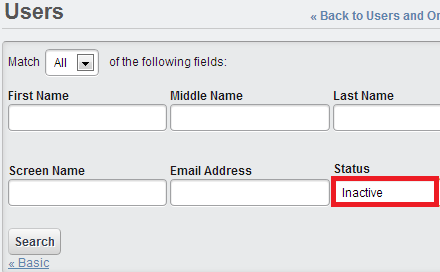
3. Search all inactive user(s).
    a) Click the Search All Users link
    b) Choose Inactive in the Status dropdown
    c) Click Search

4. Choose user(s) to delete from the inactive list.


Done!!

Saturday, September 7, 2013

How to pass parameters with p:remoteCommand

In some cases, we might want to invoke an server side action via java script.
This can be done by <p:remoteCommand />.
with <p:remoteCommand />, we could assign a name to the remoteCommand component, then invoke the remoteCommand's action with the given name
<p:remoteCommand name="rcTest"
    action="#{myBean.someAction}"
    update="any_component_id" />

<p:commandButton value="remote command test" onclick="rcTest();" />

In Addition, we might want to pass in some parameters to our server side action with the following syntax.
<p:commandButton value="remote command test" 
    onclick="rcTest([{name:'myName1',value:'myValue1'},{name:'myName2',value:myValue2}]);" />

Tuesday, September 3, 2013

How to create side menu layout with p:menu

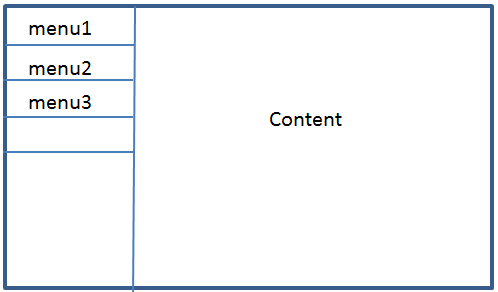
The objective of this post is to create side menu layout as below.

1. create a side menu template
<?xml version="1.0"?>
<!DOCTYPE html PUBLIC "-//W3C//DTD XHTML 1.0 Transitional//EN"
"http://www.w3.org/TR/xhtml1/DTD/xhtml1-transitional.dtd">
<html xmlns="http://www.w3.org/1999/xhtml"
 xmlns:h="http://java.sun.com/jsf/html"
 xmlns:ui="http://java.sun.com/jsf/facelets"> 

<h:head />
<h:body>
 <h:form>
        <table>
            <tr>
                <td><ui:insert name="sidemenu" /></td>
                <td><ui:insert name="content" /></td>
            </tr>
        </table>
  </h:form>
</h:body>
</html>

Sunday, September 1, 2013

How to create side menu layout with p:tabView

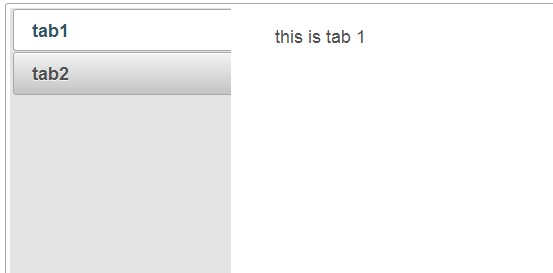
The objective of this post is to develop below layout with <p:tabView /> component.

With the tabView component, the above layout could be easily developed with the orientation attribute.
<p:tabView orientation="left">
    <p:tab title="tab1">
        <h:outputLabel value="this is tab 1" />
    </p:tab>
    <p:tab title="tab2">
        <h:outputLabel value="this is tab 2" />
    </p:tab>
</p:tabView>

output:

related topic.
How to create side menu layout with p:menu

Done!!

LinkWithin

Related Posts Plugin for WordPress, Blogger...