Saturday, November 30, 2013

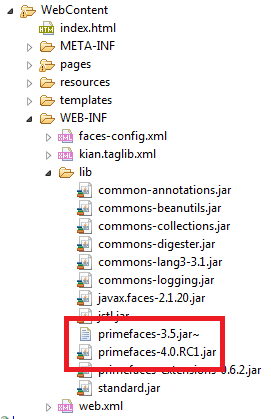
How to upgrade to PrimeFaces 4 from PrimeFaces 3.x

It is simple to upgrade from PrimeFaces 3.x to PrimeFaces 4.0
What need to do is only remove the primefaces-3.x.jar, then add the primefaces-4.0.jar into application lib folder.


Done!!

Wednesday, November 27, 2013

How to export database with Oracle SQL Developer

1. Open Oracle SQL Developer

2. Tools > Database Export...

3. -Browse for the export file location
    -Choose configured database connection to export
    -If wish to proceed to summary directly, then check Proceed to summary
    -Click Next

Sunday, November 24, 2013

Thursday, November 21, 2013

Adding JBoss AS7 Server Plugin in Eclipse

Add JBoss Server Runtime

1. Open Server Runtime Environments
    Window > Preferences > Server > Runtime Environments

2. Click Add to open New Server Runtime Environment dialog > Next

Monday, November 18, 2013

Portlet localization in Liferay

There is no question that Liferay portal supports localization.
But how the localization support for Portlet deployed in Liferay When locale changed?

To support localization for our own developed portlet.
1. Produce different resource bundle for different languages.
    a) By default, Portlet developed with Liferay Plugin SDK comes with a resource bundle named as Language_en_US.properties
    b) duplicate Language_en_US.properties, then rename it to suit other locale. eg, Language_in_ID.properties.

    c) replace all the bundle keys with new bundle description.

2. add the new resource bundle into liferay-hook.xml


Done!!

LinkWithin

Related Posts Plugin for WordPress, Blogger...