Sunday, June 30, 2013

How to create database view with Oracle SQL Developer Data Modeler


In this post will show how to create database view, the creation of database view in Oracle SQL Developer Data Modeler is different with the creation of database view, and it is missing from the previous posts.

Steps:
1. Make sure the SQL Developer Data Modeler is showing the relational view.
a) click on the New View icon
b) move the cursor to the workspace (top-right pane) to bring up the View Properties dialog.
Click New View icon

Saturday, June 29, 2013

How to backup Oracle SQL Developer Data Modeler project


Once we have completed the data modeling project with Oracle SQL Developer Data Modeler, normally we will need to backup the files or future reference or it could be backup and then save it with our team members or superiors.

platform:
1. Oracle SQL Developer Data Modeler

There are 2 ways to backup the data modeling project.
1. With the "Save As..." feature of the data modeler
2. Manual

Saturday, June 22, 2013

How to programmatically append "WHERE" keyword

When querying database from program (Java, .Net, PHP, etc) with criteria (WHERE and/or AND clause), normally we will need to check the existence of WHERE or whether this is the first criteria and programmatically append the WHERE or AND keyword before search criteria..
eg.
String myQuery = "SELECT * FROM TABLE_A";
if(!myQuery.contains("WHERE")) {
    myQuery.append(" WHERE ");
} else {
    myQuery.append(" AND ");
}
// append criteria

Sunday, June 16, 2013

How to export data model to DDL with Oracle SQL Developer Data Modeler


This post will show post-action after the relational data model has been created.
The main purpose is to export the relational model as DDL, and this DDL is runnable SQL script to generate the database schema.
Besides that, it could help us to validate the correctness of data model during DDL generation.

Steps:

Saturday, June 15, 2013

How to add Sequence Generator to a table in Oracle SQL Developer Data Modeler


Nowadays, most of the database design will use a running sequence number as the table's Primary Key instead of a code column, especially for compound key to reduce the complexity to reference to the table.

Thus, this post will show how to define a Sequence Generator for a table in Oracle SQL Developer Data Modeler.

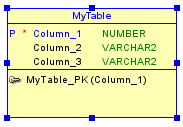
Assumed that a table already created, with a number type column as the PK shown below.
table with PK is number type

LinkWithin

Related Posts Plugin for WordPress, Blogger...